
If you've been managing rentals on Furnished Finder for any amount of time, you know the feeling: a tenant is interested, time matters, and the last thing you need is to go hunting for the lead. We made an update to help, and if you're new here, this post will catch you up on how everything works.
Here's what changed, where everything lives now, and how to get the most out of every lead that comes your way.
What changed
Booking Inquiries now go directly to your Messages inbox.
Before this update, Booking Inquiries landed on your Tenant Leads page alongside everything else. They got mixed in with other lead types that require a different kind of attention, and it slowed landlords down. Booking Inquiries are your highest-intent leads. A tenant has looked at your listing and is asking to book it. They deserve a faster path to you.
Now they have one. When a Booking Inquiry comes in, it goes straight to your inbox, the same place your direct messages live. You see it, you respond, done.
The Tenant Leads (opens in new tab) page is still there. It hasn't gone anywhere. It's actually been redesigned to make it easier to evaluate the leads that belong there. More on that in a minute.
Not all leads are the same
It's important to understand the lead types that you'll see as a landlord on Furnished Finder. Understanding your lead types is one of the best things you can do maximize your rental booking process.
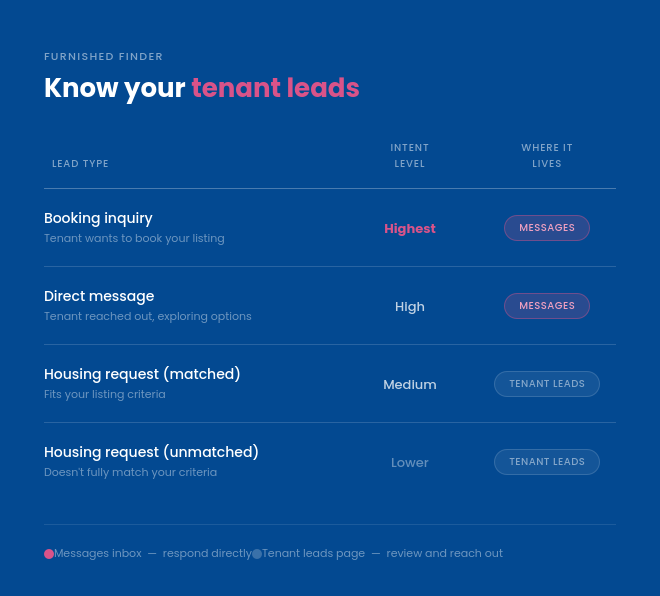
There are three tenant lead types on Furnished Finder. Each one means something different, and calls for a different response.
Booking Inquiry
A tenant has directly requested to book your specific listing. This is your highest-priority lead. They've seen your place, they want it, and they're asking to move forward with booking. The faster you respond, the better your chances of landing the booking. You'll find these in your Messages inbox.
Tenant Leads (matched)
A tenant submitted a Tenant Lead and your listing matches what they're looking for. These live on your Tenant Leads page. "Matched" means that your property has exactly what the traveler is looking for. Budget? Match. Timing? Match. Amenities requests? Match. Review this lead quickly and carefully. This lead goes to multiple landlords that fit the needs of this traveler.
If you are receiving Matched Tenant Leads that do not fit your property details, be sure to update your listing. Details such as your calendar and amenities are incredibly important to match you with the best tenant leads.
Tenant Leads (unmatched)
A Tenant Leads that doesn't fully match your listing criteria, also on the Tenant Leads page. These take a little more judgment, but don't write them off - they have have big potential.. Sometimes the fit is closer than it looks. We'll highlight what's a mismatch. It may be something like budget, or amenities, that you can work around, or offer a solution to the traveler. Again, these go to multiple landlords, so a high quality, fast response is very important.
Even if an Unmatched Tenant Leads has no booking potential, it can give you insights into the market. Are lots of travelers coming with pets? Perhaps you can open your property to pets to get more interest. Insights such as this can be very helpful to increasing your bookings.
Bonus: Direct message
A tenant sent you a message without a formal Booking Request. They're still exploring. Maybe they have questions about availability, parking, or the neighborhood. Engage them, answer what they're asking, and guide them toward a booking if it's a good fit. Also in your Messages inbox.
How to make the most of your leads
A few things that make a real difference for landlords:
Respond quickly and thoroughly. Booking Inquiries are the highest-intent leads you have. A quick, direct reply, even just confirming you received it and asking a couple of questions, goes a long way. Travelers are often looking to secure their next rental fast. Your response times matters.
Check your inbox regularly. With Booking Inquiries now alongside direct messages, your inbox is where the action is. Make it a habit, especially in the first 24–48 hours after a new listing goes live. Also, be sure that your notifications are on. You can adjust this in your settings. Just go to Edit Listing > Notification Settings.
Update your calendar. An accurate calendar is a useful calendar. Our system uses your current availability to match you with travelers searching for a rental. If your calendar is stale, inaccurate, or not updated, we cannot accurately match you with potential tenants. It is crucial to block any day in your Furnished Finder calendar that your rental property is unavailable. You can also sync your calendar with Airbnb or Vrbo for easy syncing across platforms.
Don't let leads go cold. Tenants looking for monthly housing are often working with a deadline: a work assignment start date, a lease ending, a relocation in motion. The sooner you engage, the better.
Where to go from here
Your Booking Inquiries are waiting in your inbox. Head there now and see what's come in.
Go to Messages → (opens in new tab)
If you have questions about how the Tenant Leads page works or want a deeper dive into managing each lead type, the Furnished Finder help center (opens in new tab) has you covered.